Google’s excellent desktop photo organiser software, Google Picasa, has been updated to version 3.5 today, with the big new feature being face recognition (or ‘name tags’ as they like to call it).
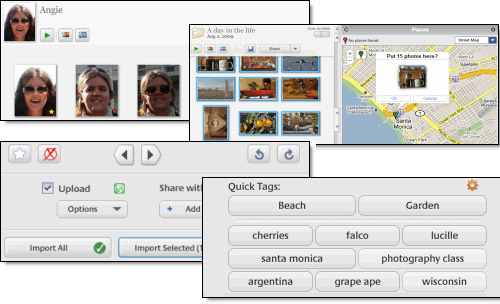
Although the web-based Picasa Web Albums photo-sharing service has had this feature for over a year (and it’s already appeared in programs like Apple’s iPhoto ’09), Picasa’s implementation is particularly slick.
Like other face recognition programs, Picasa hurtles through your hard drive scanning all your photos and slapping tags on any face it recognises, but it cleverly also organises faces it can’t recognise into browsable collections of ‘Unnamed People’
This makes it much faster to set about naming new groups of people than iPhoto’s sluggish method, which forces you to select photos one at a time for naming, and being desktop based, the software is snappier than using the web based version.
Picasa 3.5 also offers the usual slew of image editing tools, as well as built-in Google Maps integration for manually geotagging pictures.
New photos can now be automatically uploaded to Picasa Web Albums from your camera or memory card.
The program remains absolutely free (huzzah!) and can be downloaded for Macs and PCs from here: Google Picasa


I can’t understand why anyone would want to spend money on Adobe’s expensive Elements software when this free program does just about everything for free.
I’ve been using Picasa for over a year now and although it’s a bit heavy handed at times, it’s all I need to sort out my photos.
I use Picasa on my laptop, but we’re all using ACDSee Pro in the office for image sorting and organising. It’s very fast and easy to use.