 With an almost-new hard drive catastrophically failing in our office only last week, we’ve never been so aware of the fragility of our precious data – and the need to back it up thoroughly.
We like to go for the belt’n’braces approach, backing up our data both locally and online, but with so many choices available, UK tech site TechRadar have usefully posted up a review of “six reliable online backup services for your Mac.”
Before you Windows users retire from this article at speed – hold your horses! – all of the six back up services reviewed also work on PCs.
The test
The test involved six contenders – Backblaze, Carbonite, CrashPlan, DropBox, SugarSync and Mozy.
Mozy was found to be the easiest to use, with DropBox, and SugarSync in joint second place. Backblaze and Mozy were found to be the most Mac-friendly, and when it came to the all-important ease of recovery, the same two came on top.
All of the services let users access their files and restore them via a web interface, as well as their own client software. In the test, DropBox and SugarSync were found to have the best browser interfaces.
 Avoid Carbonite!
From our experiences, we’ve found Carbonite to have the worst customer service imaginable, and we could never recommend the service to anyone.
Although the service worked perfectly well for one of machines in the office, we’ve had several nightmare experiences with the company.
Last year, the service managed to lose our entire 120GBs worth of back up, and it was only after hours (and we mean hours) of dealing with a slew of clueless simpletons over a period of several weeks that the data was finally recovered and made usable.
The service has now fallen over again after we upgraded to Windows 7, resulting in Carbonite forcing us to embark on another endless cycle of emails and frustrating chat sessions with operatives who have no recollection of the previous correspondence – and then having to start all over again.
The cycle inevitably ends up with us being implored to call their US helpline to sort it out – at our own expense, naturally.
Exasperated requests for a refund to free us from this endless cycle of grief were met with a prompt reminder of their “we don’t do refunds” policy, and an invitation to view some tiny small print somewhere.
Awful company, awful service. Avoid.
Price plans compared
Backblaze works out at a straight $5 per month per computer, while CrashPlan is $3.47 per month for a single machine ($125 for three years), with a ‘family plan’ offering to back up all your household computers for a very competitive $5 per month.
Carbonite is $54.95 for a single year ($4.57 per month) to $129.95 for three years ($3.60 per month), with Mozy priced a little bit more at , $4.95 per computer per year. SugarSync serves up flexible plans, running from $4.99 per month for 30GB to $24.99 per for 250GB.
 Extras
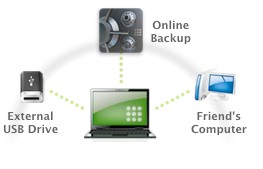
CrashPlan also includes the ability to back up locally for free to either a hard drive or another computer, giving the the option to back up locally and in the cloud in one go.
We like the sound of this very much – with two back ups, you’ll still be able to access your data if the Internet goes down. It can also send status reports of your backup to you via email or Twitter.
DropBox impressed with a sleek iPhone application that lets users access your files from their phone (read-only), and documents can be shared by sending a link through email.
SugarSync goes one better by offering BlackBerry and Android apps as well as an iPhone one.
The winner?
TechRadar’s judges weighed up the options and declared CrashPlan to be the winner:
If you’re looking for a single backup solution, then CrashPlan is a great option. It’s the only product capable of backing up both locally (handy for speed) and online (handy for security). If you use multiple Macs, then SugarSync is your best bet – you can combine backing up essential files with syncing them.
It just beats DropBox thanks to better price plans and features. But if backup is all you need, go for CrashPlan. It’s not the most elegant service, but its ability to back up every Mac in your home for $5 per month makes it a winner.
We’ve been persuaded by their arguments too, so we’ll be bailing out early from our Carbonite subscription to give this one a go.
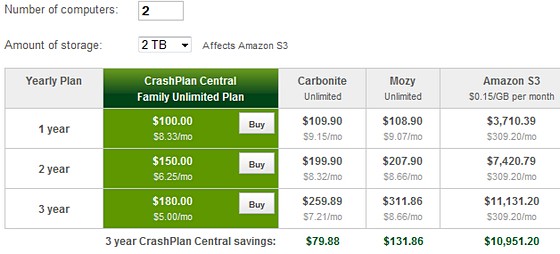
CrashPlan’s website has a handy Yearly and Monthly Cost Calculator for their various price plans. Here’s how their two PC pricing pans out:
[Via]
Local backups
Don’t forget to back up your data locally too. If you don’t fancy using CrashPlan’s handy local storage option, Lifehacker has posted up a handy guide of the five best offline backup tools.


I switched our small company backup to CrashPlan almost a year ago. We do local and off-site backup of all our servers and many of our desktops. We paid for the CrashPlan Pro software, but we pay no monthly fees. We use our own computers for the offsite backup. It is very fast and very efficient in terms of both bandwidth and disk usage. Very happy with it.
I’m going to give CrashPlan a swirl next week. I like the fact it backs up locally as well as online.
Lee – I read and cringe at your Carbonite experience. I am responsible for the Carbonite support team. This is far short of the experience we want to create for our customers. Apologies. I would like the opportunity to hear your experience first hand and use it as a teaching moment for our entire staff. Please let me know how I can reach out to you directly. My contact information is provided with this post. Thanks, Jeff
I used to use Crashplan. But it turns out there’s a bug that silently corrupted backup archives, which the Crashplan client does not alert about. Nor is there any mention in any of the release notes about the bug, or how to fix it. More details at http://try-dot-ch.blogspot.com/2010/03/crashplan.html
CrashPlan staff have responded to Nik’s problems with CrashPlan. Whilst they admit to miscommunication from their support staff, CrashPlan has not caused any corruption of backup data. They have also explained the confusion between Nik and CrashPlan support. The CrashPlan software did not corrupt Nik’s data and there are no known bugs which cause corruption.
More details at https://crashplan.zendesk.com/entries/140286 with a full explanation on the second page.
Cheers for the feedback, John. We’re going to be trialling Crashplan soon so we’ll post a review a later.
Very good written triumph article – I love all things triumph, but cant see many comments. Any how great stuff. Ill pass this on to a friend or two, thanks for this.
My first attempt at online backup was with Backblaze. I had around 700GB to backup, and soon discovered that it would take over SIX MONTHS to finish backing up, and would require that my computer was on the whole time. I asked them about seeding my initial backup by mailing a hard drive, but they didn’t offer that option.
Soon after, I discovered CrashPlan. Not only do they offer initial backup seeding, but I can have multiple backup destinations. Now, I have all of my data backed with their servers, and an additional local backup for quick recovery if I need it.
Hmm if you would be kindly to add at comparison http://www.dmailer.com/dmailer-backup.html i think CrashPlan wont triumphs in comparison with it. And also how can you make a comparison to prices when all are different at services and quality ?
The best from my oppinion is Dmailer at both prices and quality of the service provided by them.
I have started to use http://www.blockbackup.co.uk the main reason is they offer the best elements of the above suppliers but are cheaper for me as I only need to backup 20GB of data.
CrashPlan is brilliant.
(1) Customer support has been very friendly, helpful and responsive on the one or two occasions where I had questions.
(2) Tim R’s comment above about the ability to “seed” your backup is crucial. I think some backup services make use of the fact that it would probably take you forever to actually upload all of your data. CrashPlan makes it easy to get all of your data uploaded on their system within a few days. And the charge for using the seed service is very reasonable.
(3) Multiple backup locations are also key. I backup to a dedicated local hard drive, and to CrashPlan’s system. If CrashPlan ever goes out of business or has a problem, I have my local backup. If my local backup gets wiped out in a fire, theft, etc. I can always restore my data from CrashPlan.
(4) I have tested the ability to restore files from CrashPlan. It was very easy and straightforward. The files were quickly downloaded and restored. Perfect.
(5) The pricing is excellent, especially since this is for unlimited data. I backup all of our household computers for a mere $5/month.
(6) The CrashPlan+ software is very easy to use. I don’t have to schedule backups, all of my data is automatically backed up in the background without me needing to do anything. This is especially useful for other family members who would never think to activate a backup.
Best,
Adam
does CrashPlan back up external hard drives that are attached to a computer? cannot find this answer on their website — also are there any issues with CrashPlan backing up Thunderbird or Foxfire user files when the programs are open on the computer – can’t find this on their site either – thanks in advance — we are going to switch to something instead of Carbonite — had a friend go through grief and more grief to get files from them, and never really fully got restored — a nightmare , so we decided it is time to change – thanks
Hi AZ – yes, CrashPlan will back up to attached USB hard drives/flash drives, but NOT to mapped Windows drives (e.g. an attached NAS device, like a Drobo box) unless you fiddle about with these botches:
https://crashplan.zendesk.com/entries/30966-backing-up-to-a-mapped-windows-drive
http://support.crashplanpro.com/doku.php/recipe/back_up_windows_mapped_drives?redirect=1
I am using Crashplan – I reformatted my computer, used the same Win7 disk, key, and computer name, and Crashplan told me I could not use my backup. I had to delete it because now it thinks I’m using another computer. -.- Even the software said, “This backup was made using ATLANTIS and you are on ATLANTIS” lol….so 11GB backup unusable. Good thing I have another computer with the files because I needed them today. I’ll be looking into another service.
@Jeffrey Robison
I too am very unhappy with Carbonite and the experience with tech support. I am so frustrated with the special character situation with files. I cannot do a complete restore every time I need to access a file with special characters in it. Or at least that was the advice given to me by the tech support.
Terrible!!!
I’m leaving Carbonite as well. They throttle you down to 100kbps (upload) for data 200GB or more. Carbonite will never catch-up to what I need backed-up.
For multiple computer backups,i think Safecopy backup is better.I switched from Mozy to Safecopy backup of its prices.So i’m glad i have an affordable online backup software for all my important file backup.
I’m currently looking to replace crashplan. I agree it’s a simple backup solution and the ability to backup to local servers (which is all I’m interested in, really) is excellent.
However.. I recently suffered a hard disk failure and there crashplan failed. hard.
I reinstalled the OS and crashplan, ‘adopted’ the old machine and then.. nothing. It sat there ‘synchronizing’. I don’t want to synchronize I want to restore! That was 4 hours ago. Still ‘synchronizing’. At this point I’m resigned to the fact I’ve lost my data. Epic fail for backup software to not be able to restore, TBH.
Basically, anything you put into crashplan is a black hole. You might as well delete it
Hi
We are now providing hosting in the UK using CrashPlan PRO the business edition, we charge £5 per computer unlimited space, with telephone and email support in the UK
http://www.crashplanuk.com
There is a free 30 day trial for Mac, Windows and Linux.
Craig
Is this directly affiliated and approved by CrashPlan?
@mike s
Yes, we are the UK Partner for CrashPlan, our software is based on CrashPlan PRO the business edition but we sell it to home and business users along with unlimited storage space on our UK based servers.
I’m using CrashPlan, along with Mozy, for my online backups (yeah, I use 2 online backup services, but I don’t want to lose anything!). After Mozy dropped their unlimited offering, for those looking for unlimited online backup we’re recommending Backblaze or CrashPlan.
The way I see it, I’d recommend Backblaze to my mother (no options, just install it and it’s running) but I’d recommend CrashPlan to a colleague (lots of options, highly configurable)
Read my full CrashPlan review at http://www.onlinebackupsreview.com/crashplan.php
Good review – here are a few recent changes as of June 2011:
You get 5GB of cloud storage space with the FREE version, but now there is no restriction to the number of computers you can sync/backup (up from 2).
It gives you the ability to upload and sync any folder on your computer.
It is the only service that offers such a broad device and OS support with apps for BlackBerry, Android, iPhone/iPad, Symbian, not to mention your computer!
You can also stream MP3 music files to your smartphone or computer.
Also if you use the below referral code you get a bonus 500MB extra on top of your Free 5GB!
[link removed]
Hope it helps someone.
I will stop using CrashPlan
I’ve been using crashplan for 5 months and it worked ok in the beginning, but now I haven’t been able to backup for 7 days, the client says that that my subscription expire and the server is unreachable. I checked my account and still have many days available.
I contacted the support team and they responded quickly with instructions that i followed and didnt solve the problem, after that I have replied twice and can’t even get a simple response from them.
SPAM ALERT!!!!
This post is NOT about Crashplan, as much it is a way for the poster to receive “referral credits” for him/herself at Sugarsync (another backup site)
Naughty Naughty!
Cheers ET: link now removed.
crashplan is defintly the best solution …
dropbox is too expensive, let’s see what google drive will bring …
next !
Sebastien
I too have found many issues w/ Carbonite. I am a fan of crashplan. I did NOT renew w/ Carbonite because it is a memory hog AND backs up very slow and throttling is a pain. I have about 300 GB to backup.
I am happy w/ crashplan so far.
I had to quit Sugarsync because it doesn’t handle file bundles on the Mac, which is what a couple of my work apps use to store data. Dropbox handles changes to files within the file bundle and properly syncs those changes.